Unlocking the Secrets of Nether Portal Hubs: A Minecraft Enthusiast’s Guide
Are you ready to take your Minecraft world to the next level? Building a Nether Portal Hub is one of the most powerful ways to connect distant locations in your world, enabling fast travel and efficient resource gathering. In this guide, we’ll break down the process in detail, from the basics of portal math to advanced hub design and troubleshooting.
But before we dive into the nitty-gritty, let’s talk about why Nether Portal Hubs are so important for Minecraft enthusiasts. With the game’s vast open world and endless possibilities, it’s easy to get lost (literally). A well-designed Nether Portal Hub can save you time, resources, and frustration, allowing you to focus on building, exploring, and surviving in your Minecraft world.
How Nether Portal Linking Works
Before we start building our hub, it’s essential to understand how portals work. In Minecraft, portal linking is based on a simple 1:8 ratio for X and Z coordinates. This means that if you want to link two portals in the same dimension, you need to calculate the correct coordinates using this ratio.
For example, let’s say you want to link two portals at (100, 200) in the Nether. To do so, we first convert these coordinates to overworld space:
- X-coordinate: 800 (X = 100 * 8)
- Z-coordinate: 1600 (Z = 200 * 8)
Now that we have our overworld coordinates, we can start building our hub.
Hub Structure
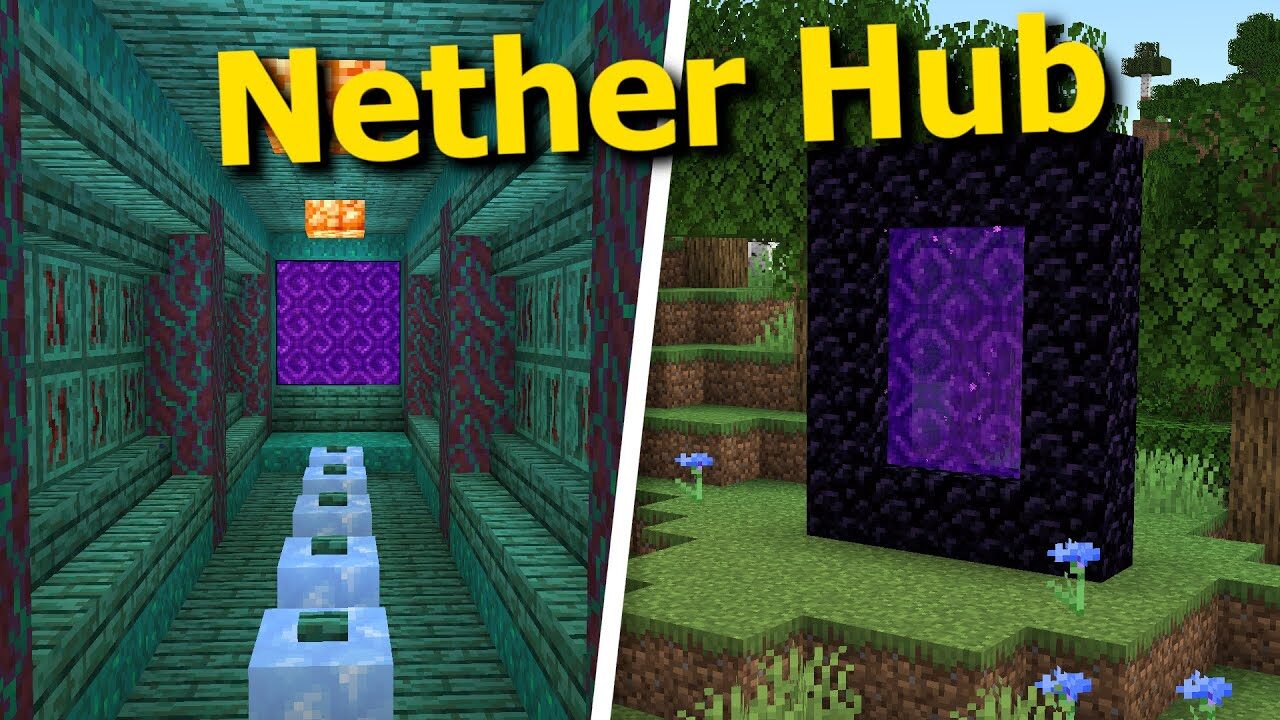
When it comes to designing your hub, there are no hard-and-fast rules. However, most players agree that a circular or square design is the way to go. This layout provides easy access to all parts of the hub and makes it simple to add new features and expansions in the future.
For our example hub, let’s assume we’re using a circular design with the main portal in the center and tunnels branching out in cardinal directions. We’ll use blast-resistant blocks like stone bricks or blackstone for the hub and tunnels, as well as glass for walls and visibility.
Safe Tunnels
One of the most critical components of any Nether Portal Hub is safe tunneling. Tunnels should be at least 3-block wide to prevent Ghast damage, and we’ll light them up to prevent hostile mob spawns. For speed, we can use blue ice for boat travel or soul sand with Soul Speed boots.
In our example hub, we’ll build tunnels that branch out from the main portal in all four cardinal directions. We’ll also add some decorative features like glowstone lanterns and pillars to give the tunnel a cozy atmosphere.
Advanced Tips & Troubleshooting
As you build your Nether Portal Hub, there are a few things to keep in mind to ensure everything runs smoothly:
- Avoid portal overlap: Don’t build portals too close together in either dimension, or they may link incorrectly. A minimum of 100 blocks apart in the Overworld is recommended.
- Vertical portals: If you need portals stacked at different heights, ensure their Y-levels are far enough apart to prevent accidental linking.
- Nether roof hubs: For ultimate safety and speed, consider building your hub on the Nether roof (above bedrock). No mobs spawn here, and the terrain is flat.
- Biome choice: Warped Forest is ideal for hubs due to fewer hostile mobs.
By following these tips, you’ll be well on your way to creating an epic Nether Portal Hub that will revolutionize your Minecraft experience.
Sample Workflow: Linking Two Overworld Bases
Let’s walk through the steps to create a sample workflow linking two overworld bases:
- Base A: Overworld (X: 800, Z: 1600)
- Nether Coordinates: (800/8 = 100, 1600/8 = 200)
- In the Nether: Go to (100, 200), build and light a portal.
- Repeat for Base B: Calculate its Nether coordinates and build the portal there.
- Test: Enter each portal and confirm correct linking.
By following these steps, you can link two overworld bases and create an epic network of travel and exploration opportunities.
Conclusion
Building a Nether Portal Hub is one of the most rewarding experiences in Minecraft. With careful planning, advanced design techniques, and a little bit of creativity, you can unlock a world of possibilities and take your gameplay to the next level. Whether you’re a seasoned pro or a new player, we hope this guide has inspired you to build an epic Nether Portal Hub that will revolutionize your Minecraft experience.
So what are you waiting for? Grab your pickaxe and get ready to build!

Related Posts